Revel3D

Take your game further.

Bring the worlds you've built to more players. Revel3D combines game conversion, powerful 3D rendering, and visual development tools to help studios adapt, enhance, and deliver their games across devices.

Read the development journal
Revel3D / In development

Extras / Progress

The development journal.

Follow our progress toward converting clients' games into portable Three.js experiences.

Terminal: converting a Unity scene to portable Three.js.

Our thesis is to take a client's existing game and deliver a portable Three.js version. Terminal demonstrates the scene-conversion part of that work: a Unity environment brought into the browser with its assets, lighting, materials, and interactive navigation.

We brought the Unity scene's geometry, textures, layout, and baked lighting data into our browser pipeline. That initial import was relatively straightforward with the tools we already had. The harder part was translating Unity's material and lighting behavior into Three.js so the scene retained its original appearance.

We made progress by leaning on Three.js's built-in lighting and material capabilities, reducing our reliance on complex custom reflection workarounds. That gave us a clearer foundation for resolving visual differences and refining the result.

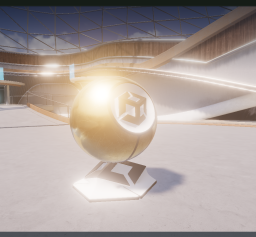
  1. Terminal v1: a wide view of the imported scene with a bright highlight on the gold material sphere
    v1 Ingestion

    Bring the scene across.

    Import the Unity scene's assets and layout into Three.js. Get the scene running in the browser, then identify the lighting and material differences that still need work.

    What we learnedA successful import is the beginning of visual validation.

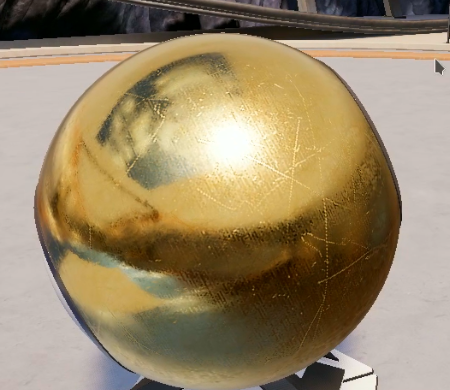
  2. Terminal v2: a close-up of the gold sphere showing surface scratches and environmental reflections
    v2 Faithful recreation

    Get the source right.

    Recreate the Unity scene faithfully in Three.js, matching its lighting and material response using the renderer's built-in capabilities.

    What we learnedCorrectness needs a faithful reference before enhancement.

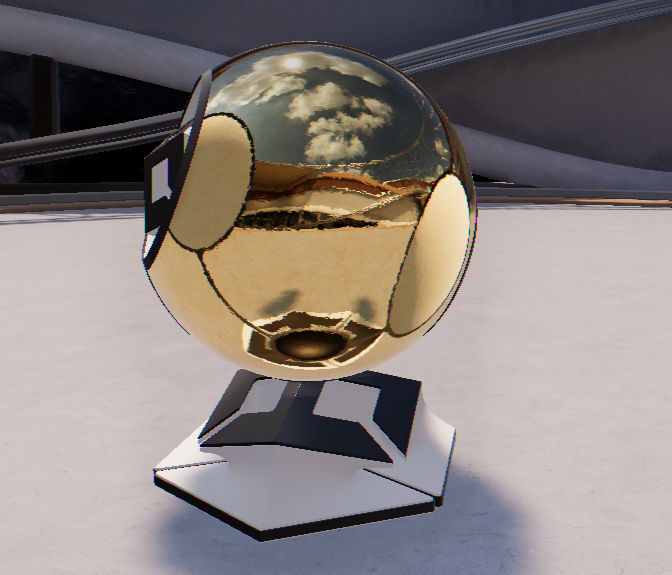
  3. Terminal v3: the reflective gold sphere and its stand in the architectural scene
    v3 Enhanced presentation

    Build on that foundation.

    Build on the conversion with Three.js post-processing, including ambient occlusion and RGB shift, to refine the presentation beyond the original Unity scene.

    What we learnedEvaluate visual enhancements against the established baseline.

Try the Unity-to-Three.js conversion

Open full demo ↗

Explore the conversion capability behind our game-portability thesis. This Unity scene now renders locally in Three.js; the device switcher previews desktop, phone, and tablet layouts. The holograms use translated Unity shader graphs; water remains simplified.

01 / What we're building

Convert existing games into portable Three.js versions.

Clients bring the game they've already built. Our conversion pipeline, runtime, and authoring tools are being developed to carry that game into Three.js, preserve its identity, and make it accessible through the browser.

Import

Bring the assets.

Convert geometry, textures, materials, and animation from existing pipelines into validated browser-ready bundles.

Author

Build in the browser.

Edit scene layouts, lights, and material assignments. Shatter, our material graph editor, compiles connected nodes into runtime shaders.

Run

Render on the device.

The browser draws the scene and handles interaction locally. The Terminal demo above is a working example of that approach.

02 / The engine

The systems behind the scene.

Converting a client's game means carrying over more than its visual assets. Our runtime and tools address animation, effects, worlds, networking, and rendering, with working demonstrations across these systems.

Animation & characters

Clip playback, locomotion blending, rig mappings, and reusable character loading. Combat and movement demos exercise these systems.

VFX & particles

Particle simulation and effect rendering, with imported material graphs using the same compiler as Shatter-authored materials.

Physics & destruction

Destructible geometry, clearance systems, and rebar experiments. These remain subsystem prototypes.

Worlds & vehicles

Biome layouts, interactive grass, modular placement, and vehicle construction. City Drive shares its saved project with the scene editor.

Networking

A shared protocol, client timing, server identity, and presence, supported by a local multiplayer development server.

Rendering & tooling

Lighting, reflections, and shader tools, with structured engine APIs for automated workflows. Terminal brings 207 instances and 42 materials into the browser.

03 / Conversion workflow

From source assets to a running scene.

A client's existing game is the starting point. We identify what can transfer, translate the parts tied to its original engine, and validate the result in the browser. Terminal shows this process for a Unity scene.

  1. 01

    Import the source

    Bring across meshes, textures, transforms, material assignments, and supported animation data.

  2. 02

    Translate & validate

    Recreate material and lighting behavior. Check asset bundles and compare the rendered result with the source.

  3. 03

    Run & refine

    Load the scene in the browser, reduce geometry transfer size, and refine the experience across viewport sizes.

Compatibility varies by source format and feature. Terminal shows one conversion in detail; support expands through continued research and validation.

04 / Cloud research

Exploring what can run beyond the device.

Alongside the local engine, we're testing cloud graphics and simulation. These are separate research demonstrations with saved validation reports; integrating them into the platform is ongoing work.

Lighting

Send lighting data to the browser.

Cloud GPUs calculate surface lighting, shadows, and reflections. The browser receives samples and reconstructs the image locally. Visual differences from the reference remain.

Simulation

Simulate remotely, draw locally.

A cloud GPU runs particle gravity and sends state updates to the browser. Local interpolation connects those updates for display.

Multiple GPUs

Divide the computation.

Two physical GPUs share gravity and visibility calculations. Saved tests establish correctness; a throughput advantage has not been proven.

Image streaming

Test server-rendered output.

A separate experiment delivers rendered frames to a browser receiver for offline rendering and benchmarks.

05 / Development progress

Working demonstrations.
Specific things learned.

Each study tests part of the platform. Terminal is available to explore above; the other studies support development of the engine and tools.

Terminal
Unity-to-Three.js scene conversion, baked lighting, material translation, and local reflections.
Shatter shield study
35 imported material expressions, edited in-browser with previews using the runtime compiler.
Combat & locomotion
Character animation kits, combat training, and weapon attack blending.
VFX library
Particle effects and imported material graphs rendered through the engine pipeline.
City Drive
A vehicle driving demo connected to the same saved project as the scene editor.
Cloud experiments
Deployed lighting, gravity, and multi-GPU demonstrations with saved validation reports.

06 / The opportunity

Existing games. A wider reach.

The business thesis is game portability: help clients bring their existing games to a portable Three.js runtime. The conversion technology and supporting tools are how we turn that thesis into a repeatable capability.

Reach players through a link.

Browser distribution reduces installation friction and makes games easier to share. It also gives studios a direct channel to their audience.

Our goal is to carry that experience across desktops, phones, tablets, and browser-based handheld environments.

Preserve the client's investment.

Art, environments, animation, and gameplay represent years of work. Our goal is to carry that investment into a portable version while preserving the game's identity.

Each conversion strengthens the pipeline, runtime, and tools we can bring to the next client project.

What's next

Help make game portability repeatable.

We're raising to expand conversion coverage, develop the supporting runtime and tools, and bring this capability to client games.

The engine API, scene editor, Shatter prototype, and cloud demonstrations are running. Integration, broader format support, and production readiness are the next steps.

investors@revel3d.com
Revel3D / Investor brief

Bring existing games to more players.

Revel3D's thesis is to convert clients' existing games into portable Three.js versions that players can access through a browser. Terminal demonstrates the scene-conversion capability behind that thesis: Unity assets, lighting, and materials brought into a locally rendered Three.js experience. Our engine and authoring tools support the broader work of carrying complete games across.

Browser-native worlds
Games run interactively in the browser on-device. Structural differentiation from cloud gaming — no video stream, no server round trip for input.
Full engine stack
Animation, characters, VFX, physics, vehicles, world layout, networking, rendering, and input — organized as a production engine with a public API, standalone package build, and strict engine/project boundary.
Bring the assets
Validated asset bundles and scene documents ingest geometry, textures, materials, and animation from existing pipelines. Conversion is asset-specific; coverage expands with capital.
Shape the world
Shatter compiles material expression graphs into runtime shaders with in-browser editing, per-node previews, and revision-checked saves connected to the scene editor.
Cloud-computed graphics
Separate deployed demonstrations: material-lighting stream, gravity simulation, multi-GPU pipeline, and image streaming. Cloud sends render data; the browser draws locally. Saved validation evidence exists; visual gaps and integration work remain.
Agent-ready toolchain
Schema-first contracts and pipeable CLI primitives expose engine state for automated development workflows — built for a lean team to ship faster.
Build what comes next
Expand from demonstrated scene conversion to broader client-game coverage. We're raising to improve compatibility, carry more game systems across, and make the conversion workflow repeatable.

Technology in active development. Asset support varies by format and feature. Cloud demonstrations have workload-specific performance and visual limits. Two physical GPUs have saved correctness evidence, not a proven speed advantage. Hero artwork is conceptual brand art, not engine output.